


Contents
For any business, especially startups or small companies juggling multiple devices or field teams, losing a phone can mean losing critical data, customer contacts, or sensitive business information. That’s where Where’s My Droid comes in: a lightweight yet powerful Android app designed to help you locate, lock, and secure lost or stolen devices.
In many businesses, employees travel, meet clients off-site, or carry sensitive data. If a device is misplaced or stolen, instantly knowing its location or locking it down can prevent leaks and data breaches. For a founder or CXO who can’t always keep tabs on every device, Where’s My Droid offers peace of mind. It means you don’t just rely on hope or luck; you have a plan.
Because Where’s My Droid runs quietly in the background, it doesn’t interfere with everyday operations. For example, if a salesperson’s phone goes missing after a client meeting, the company admin can locate it or trigger remote security features. That way, business continuity is protected, and the risk of data exposure is minimised.
For startups with limited resources, maybe they don’t have a dedicated IT staff; this app offers a simple but effective safety net. Installing it across corporate devices establishes a preemptive safeguard: if a phone disappears, the chances of recovery or securing data remain high.
Quick App Snapshot
App Name: Where’s My Droid
Best For: Small businesses, startups, remote teams, field staff, freelancers
Platform: Android (phone and tablet)
Top Feature: GPS-based device tracking + remote lock, wipe & theft protection
Who Is This App REALLY For?
Where’s My Droid is ideal for business owners or managers who handle multiple company-owned devices, especially if those devices are used outside the office or by remote employees. If your team travels, visits clients, or works from cafes or coworking spaces (like you might plan for your cafe business between Nainital and Haldwani), this app gives you a safety net for mobile security and device recovery.
It’s particularly suited for startups and small teams without a dedicated IT department. You don’t need to be tech-savvy. Simply install the app on each device, and you get a layer of protection without extra complexity or overhead.
For freelancers or solo entrepreneurs who travel often, or handle sensitive client data on their phones, Where’s My Droid offers peace of mind: even if the device gets lost, your contacts, client information, or business documents don’t disappear with it.
Finally, for any business with compliance or data-security concerns, say, you store sensitive customer data, or a client contacts the remote lock and wipe capabilities are a simple but vital measure.
Our Hands-On Experience
When we tested Where’s My Droid on a modern Android phone (recent version as of November 2025), installation and setup were straightforward. The app asked for required permissions, GPS access, device-admin permissions (to enable remote lock/wipe), SIM-monitoring permissions, etc.
Using the GPS tracking feature, we were able to pinpoint the device location on a map almost instantly. Triggering the “Ring” function made the phone ring loudly even when it was on silent, handy when you misplace the phone around the office or cafe premises.
We also tested the “GPS Flare”, a low-battery location ping, and despite a low battery (around 15%), the app successfully sent our location. That impressed us: in a real-world scenario, people often lose phones when the battery is low.
However, we noticed that certain advanced features, like remote lock or data wipe, require device-admin permissions and may not work fully on the latest Android versions due to system restrictions. Also, to enjoy features like geofencing, passive tracking or remote camera, you need to upgrade to the paid (Elite) version.
Overall, for basic recovery (lost phone, misplaced device), the free tier works reliably, but for heavy use or theft scenarios, the upgrade is worth considering.
Features of Where’s My Droid
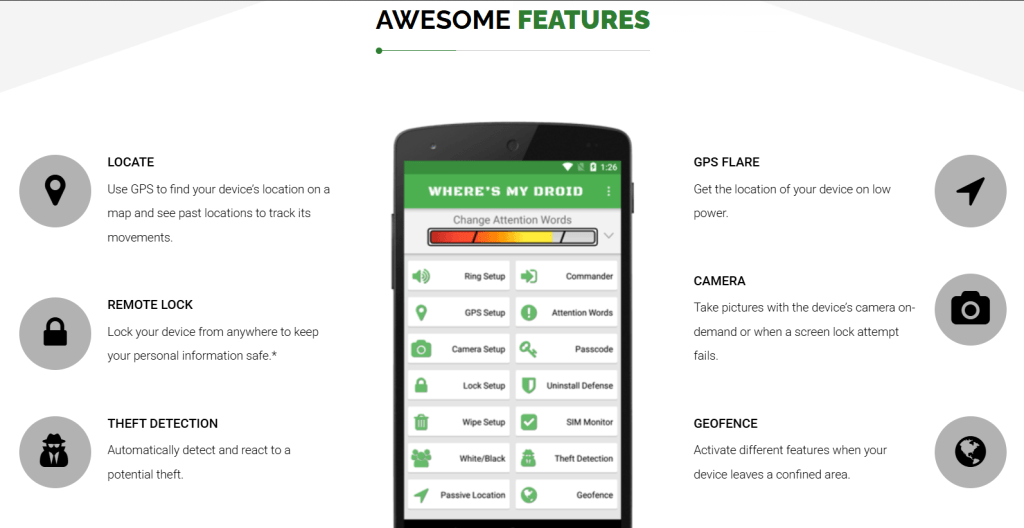
GPS Location & Tracking
Locate your device using GPS, and you get a real-time position on a map.
Why it matters: If an employee loses their phone on the go, you can track it immediately rather than waiting for them to call back, saving time and increasing chances of recovery.
Remote Ring & GPS Flare
Trigger a loud ring (even if the phone is on silent) to locate a lost phone nearby; GPS Flare sends location if battery is low.
Why it matters: Useful if the phone is simply misplaced (e.g. in the office, cafe, or bag), less stress in finding it quickly.
Remote Lock / Wipe / SIM Monitoring
If a device is lost or stolen, you can lock it remotely, wipe data, and get alerts if the SIM card changes.
Why it matters: Critical for protecting sensitive business data, client information, or contact lists, and reduces the risk of data breach.
Advanced Protection Features (Elite Version)
Includes geofencing (trigger actions if device leaves a certain area), passive location tracking, remote camera capture, location history, motion alarm, nearby Wi-Fi & device stats, prevent app uninstall, and contacts recovery.
Why it matters: For companies managing multiple devices (e.g. field sales, remote workers), this gives a richer safety net, helps not just with lost phones but potential theft or unauthorised access.
Pricing of Where’s My Droid
| Plan | Cost | What you get |
| Basic (Free) | ₹ 0 | GPS locate, GPS flare on low battery, ring feature, passcode-protected setup, alert on SIM removal, remotely enable screen lock, wipe SD card, and factory reset. (wheresmydroid.com) |
| Elite (Paid) | US $0.99/month or US $8.99/year (≈ ₹?, depends on exchange rate) | All free features plus on-demand camera, camera on failed unlock, uninstall protection, geofencing, passive location tracking, remote contacts view, view nearby Wi-Fi, apply to all devices on account. (wheresmydroid.com) |

Pros and Cons
Where’s My Droid makes it very easy to find a lost phone or secure data quickly if a device is misplaced, offering peace of mind for business owners and remote teams.
Free tier is generous: basic locating, ring, SIM monitoring, lock/wipe are available without spending anything.
Advanced security features (geofencing, remote camera, passive tracking) give extra value for businesses with multiple devices or higher risk.
On the downside, certain remote-lock/wipe features may be limited on newer Android versions due to OS restrictions, meaning not all functions are guaranteed to work everywhere.
Some advanced features require a paid subscription, so to get full security, the free tier might not be enough.
For theft scenarios (especially if the phone is turned off or the SIM is changed), recovery might not be guaranteed; relying only on tracking apps, there’s always risk.
Alternatives to Where’s My Droid
1. Google Find My Device:
Provided by the device’s OEM/Android ecosystem, it offers basic location tracking and device lock/wipe. It’s simpler and tightly integrated with Android, though it lacks advanced features like geofencing or passive tracking.
2. SeekDroid:
Another phone-tracking tool that provides remote device location & locking (and in some cases, call-log tracking or remote data access), giving businesses more control over devices. It may offer different feature sets (e.g. remote call-log viewing) depending on privacy and compliance needs, which could be useful.
IBR’s Verdict: Should You Use It or Skip It?
Our Verdict: ⭐️⭐️⭐️⭐☆
If you run a small business or startup, especially with remote staff, multiple mobile devices, or frequent field operations, Where’s My Droid is a solid, easy-to-use anti-theft and device-recovery tool. The free tier already offers useful protection, and the paid tier unlocks important security features at a modest cost.
If you want a simple, no-frills tool to recover lost phones or lock down data, this is a no-brainer. If your workflow involves multiple devices handed over to employees, or if you often travel, having this defence in place can save you a lot of trouble.
That said, don’t treat it as a bulletproof security solution; it’s a helpful tool, not insurance. For high-security needs or sensitive business data, combine it with other measures (e.g. regular backups, encrypted storage, remote device management).
Have you used Where’s My Droid on any of your phones? Drop a comment with your experience, what worked and what didn’t.
If you want to explore similar tools or want a custom mobile-device management solution built for your business, reach out via ikana.io, and we’ll help design a system tailored to your needs.


