Contents
Crypto.com positions itself as an all-in-one platform for everyday users who want to buy, sell, trade, spend, and earn on digital assets without juggling multiple services. From a single app, you can purchase hundreds of cryptocurrencies, move funds, set price alerts, access a Visa card with crypto rewards, and route more advanced trades to the Crypto.com Exchange. The homepage leans into breadth and convenience. For a typical user, this means you can start with simple purchases, and as you become more comfortable, you can explore additional tools without leaving the ecosystem.
The company’s support hub is extensive. New users receive step-by-step guidance for onboarding, funding, common actions within the app, and product-specific assistance. That lowers the learning curve if this is your first crypto account. Combined with a clean interface and straightforward navigation, the overall experience feels approachable while still offering depth for those who want it.

Features of Crypto App
1) Buy, sell, and trade across a large catalog
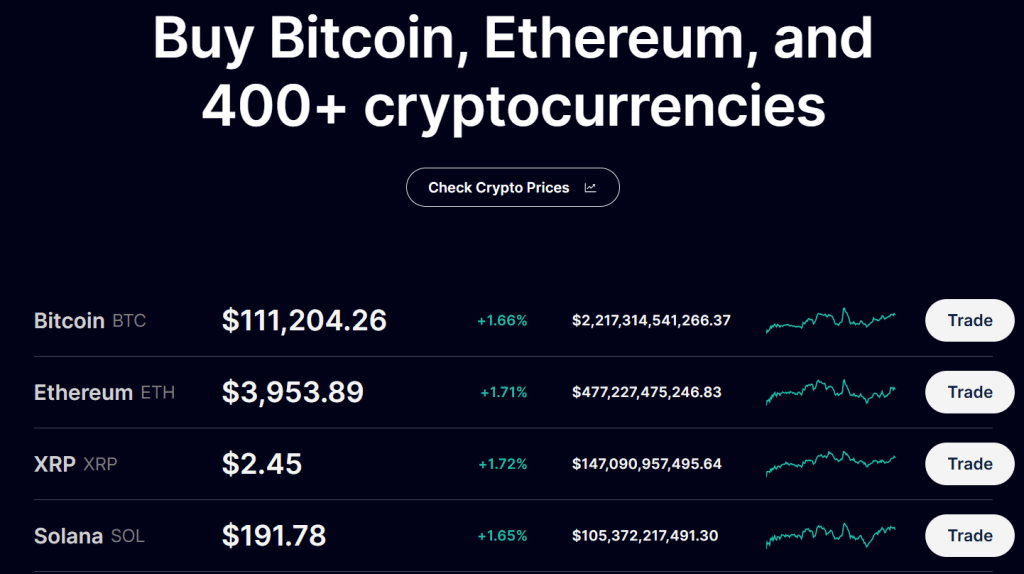
The app supports a wide list of assets with simple purchase flows and live pricing. You can set recurring buys if you want to dollar-cost average, or switch to the Exchange to place maker or taker orders with a transparent fee schedule. For newcomers, the app flow removes friction. For intermediate users, the Exchange provides more granular order control and lower trading fees when you provide liquidity.
2) Crypto.com Visa Card for everyday spending
Crypto.com offers a Visa card program where you can top up from fiat or convert crypto to spend at regular merchants. Rewards are tiered by card level and region. The headline idea is simple. You can earn a percentage back on purchases, take advantage of interbank exchange rates in supported regions, and in some markets access extra perks tied to higher tiers. The card is useful for people who want to keep value in digital assets but still spend easily in stores or online.
3) Rewards and yield options inside the ecosystem
Within the app, you will find product paths to grow idle balances or collect rewards. The options and terms vary by jurisdiction, user tier, and asset. For many users, the draw is convenience. You see your balances, available programs, minimums, and timelines in one place. Crypto.com also runs periodic promos and seasonal campaigns, which appear in the app or Exchange banners. These promos often add a small lift to base rewards or fee discounts.
4) A guided app experience with clear help content
The user guide lays out the basics with screenshots and links to deeper articles. Sections cover account setup, verification, deposits and withdrawals, converting between crypto and fiat, card usage, and troubleshooting. It reads like a friendly manual rather than a dense knowledge base. This matters because crypto tasks often feel technical. In the Crypto.com app, the steps are broken down into small actions that feel familiar if you have used any modern fintech app.
5) Proof of Reserves verification and security posture
Crypto.com highlights a Proof of Reserves program that lets customers independently verify that customer assets are held 1:1 in reserve using a Merkle-tree process. The company also publishes claims about certifications and controls, and it documents a security model that includes cold-storage custody, infrastructure standards, and external attestations. For users who care about counterparty risk, this is one of the most visible signals the company puts forward
Pros and cons of Crypto
Pros
1. One app for many jobs. Buy, trade, withdraw, spend on a Visa card, and track your portfolio without juggling multiple accounts.
2. Onboarding and guidance feel beginner-friendly. The help center and app user guide are well structured, which reduces friction.
3. Exchange fees are published with maker and taker tiers that reward volume and liquidity provision. That gives active users a clear path to lower costs.
4. Security and transparency signals are prominent. Proof of Reserves verification and published certifications give risk-conscious users more to evaluate.
5. Regionalized products. The platform adapts features for different markets, which can be a benefit if you travel or relocate.
Cons
1. Pricing varies by product and region, which makes the real cost picture more complex than a single headline rate. Users should check the fee page and card terms for their country and tier.
2. Rewards depend on card level and local program rules. To reach top perks, you may need higher card tiers or subscription programs, so plan for the total cost of participation.
3. Advanced traders may still want external tools for charting, automation, or derivatives that go beyond the Exchange feature set available in their jurisdiction.
4. The breadth of features adds cognitive load. New users can feel overwhelmed until they settle on a simple workflow for buying, spending, and securing funds.
Pricing
Crypto.com publishes a fees and limits schedule for the Exchange that shows tiered maker and taker rates based on your 30-day volume and whether you hold or lock the native token. At the entry level, maker fees are higher than at pro tiers, while taker fees start at a simple percentage and step down as volume grows. Derivatives products and specific order types use their own maker and taker schedules.
In the app, you will also find an Applicable Fees section that outlines where fees can apply across products. Examples include network fees for blockchain withdrawals, potential card program fees such as ATM or international usage where relevant to your region and tier, and other product-specific charges. Because the platform operates across many countries, the exact numbers depend on where you live and which products you enable.
The Visa card program publishes benefits and program notes by market. In many regions, you can earn a percentage back on purchases and benefit from interbank rates, with details defined by the card agreement and local help pages. Before applying, it is worth scanning your market’s card FAQ to confirm top-up options, limits, and any fees for ATM withdrawals or foreign currency transactions.
The big takeaway. Crypto.com centralizes its fee tables, but your personal pricing depends on three things. Your jurisdiction, your chosen products, and your usage. Look up the Exchange fee tier that matches your activity, review app fees relevant to deposits, withdrawals, and conversions, and check your local card terms before you commit.
How the Crypto App works.
1. Create an account and complete verification. The app guides you through identity checks and security setup.
2. Add a funding method. Depending on where you live, you can link a bank account, use a card top-up, or deposit crypto to a wallet address.
3. Buy your first asset. Start with a small amount. You can use a simple buy flow or place an order on the Exchange for more control.
4. Secure and organize. Turn on two-factor authentication, label your whitelisted withdrawal addresses, and set price alerts.
5. Explore extras. If you plan to use the Visa card, complete the card application for your region and tier. If you want lower fees on the Exchange, review the maker and taker tiers. If you want rewards, review the programs available to you inside the app.
6. Keep records. Use statements and exports in the app and Exchange to track your activity for tax or accounting.
This path gives new users a safe start while leaving room to add features later without opening more accounts.
Security and privacy of Crypto
Crypto.com presents an industry-standard security stack. The company describes an infrastructure with cold storage for customer assets, risk monitoring, and operational controls. It also highlights compliance achievements and privacy notices that map how personal data is collected and processed across products and geographies. Users are encouraged to use two-factor authentication, enable withdrawal protection features, and review Proof of Reserves to verify balances in the reserve snapshot.
From a practical standpoint, this blends company-level assurances with user-level controls. The platform commits to security frameworks and third-party attestations. You commit to good habits inside your account. If you take the time to set strong authentication, stick to whitelisted addresses, and avoid connecting your account to untrusted devices, you will get the most out of the platform’s protections.
Alternatives to Crypto
Coinbase
Coinbase is the most mainstream option in many countries, with a strong focus on user experience and regulatory clarity. It is an excellent choice for simple buys, recurring purchases, and easy fiat on and off ramps. Where Crypto.com can pull ahead is the all-in-one promise. The Visa card program, the integrated Exchange fee tiers, and the emphasis on a complete financial app will appeal to users who want spending and trading under one roof.
Kraken
Kraken is known for a robust security culture and a loyal base of intermediate to advanced traders. It offers strong order types, OTC services, and a straightforward interface with fewer promotions. Crypto.com looks stronger for users who want a lifestyle angle with a card, rewards, and an app that feels more like a modern neobank experience, while still offering an Exchange if you want it.
Binance
Binance is a feature juggernaut where available, with deep liquidity and broad product lines for advanced traders. It can feel overwhelming to newcomers. Crypto.com’s advantage is a calmer starting point, clearer regionalization, and a focus on card-based spending that blends your crypto life with daily payments. If you are optimizing purely for derivatives depth in allowed regions, Binance wins. If you want a balanced everyday app that covers buy, spend, and save in one place, Crypto.com may be a better fit.
What to expect from Crypto
Expect a polished mobile experience that feels like a modern fintech app. You can buy well-known assets quickly, set alerts, and get guided help without reading forums. If you want to spend your balance, there is a clear path to a Visa card. If you want to trade more actively, the Exchange is a tap away. The tradeoff is that pricing and benefits depend on your region and account tier. Be prepared to check your local terms before you rely on a headline.
IBR’s review
If your goal is to manage crypto in one app from buying to spending, Crypto.com is a solid pick. The guided setup, large asset catalog, and integrated Visa card make it easy to put digital assets to everyday use. The Exchange fee table is transparent, and there is a clear path for active users to reduce costs. Proof of Reserves and visible security materials add confidence for risk-aware customers. The caveat is complexity. Because pricing, rewards, and even product availability vary by region and tier, you should skim the fee page and your local card FAQ before going all in. Do that homework, and you will find that Crypto.com delivers on the convenience it advertises.
Ratings
Ease of Use: 4.6/5
Features: 4.5/5
Template Quality and Exports: 4.1/5
Pricing and Flexibility: 4.⅖
Overall: 4.4/5
Crypto.com is easy to recommend to beginners who want a single app that does the basics well and leaves room to grow. The shopping list is compelling. Buy and sell popular assets. Spend with a Visa card. Access an Exchange with published fees and volume tiers. Verify reserves and review security details in plain language. People who value convenience and a familiar mobile banking experience tend to love that combination. More advanced traders who need specialized tools may prefer to pair Crypto.com with a dedicated pro terminal. For everyone else, the platform earns a spot on any shortlist, and it is reasonable to recommend it once you confirm your local pricing and benefits.
If you are building a crypto or fintech brand and want content, PR, and growth that compels users to try your product, Ikana Business Solutions can help you launch and scale. We turn complex features into clear stories, build SEO content that ranks, and ship landing pages that convert. See how we approach go-to-market and brand lift at https://ikana.io.