Regram App Review: Easiest Instagram Repost Tool for Creators and Influencers
For business owners, especially those running small teams, reposting user-generated content is one of the fastest ways to show trust. People want to see real customers using your product or service. If a customer posts a great picture of your restaurant, your coffee shop, your store, or your event, Repost App allows you to take that post, download it, and share it again through your own Instagram account while still giving credit to the original creator. This saves time, removes difficulty, and keeps your content pipeline active even on days when you do not have new designs or new photos.
The purpose of Repost App is simple. It reduces effort. It reduces your dependency on manual media saving. It reduces unnecessary steps. This is especially important if your business relies on social media as the primary channel for brand awareness or customer trust. Many small businesses struggle because they rely only on their own photography and do not make use of customer testimonials or real stories. Repost App solves that problem by making user-generated content a part of your content calendar.
Quick App Snapshot
App Name: Repost App
Best For: Social media managers, freelancers, marketing teams, small business owners, creators, influencers
Platform: Web
Top Feature: Download and repost photos and videos from Instagram using a simple link-paste workflow
Who Is This App Really For
This app works well for small business owners who want to showcase customer stories without spending time editing or manually downloading media. If your customers post content about your brand, this app helps you highlight it in the simplest way possible.
It is also ideal for freelancers and social media managers who need to maintain high activity across multiple accounts. Repost App cuts down repetitive work and keeps your workflow organized by allowing easy access to repost history and previously downloaded media.
Creators and influencers benefit because they often collaborate with other creators or brands. When they need quick reposting for partnerships, shoutouts, or community highlights, this tool gives them a fast and quality-centric workflow.
Even small marketing teams can benefit from this app. If a team member finds valuable user content, anyone can paste the link into the Repost App and save it. There is no technical barrier. The learning curve is small. Anyone on the team can use it.
Our Hands-On Experience
To understand the real workflow, we tested the Repost App using a standard Instagram link. After copying the link of a public photo post, we pasted it into the tool. Within a few seconds, the app loaded the media and presented a download button. The image quality remained intact and identical to the original Instagram post.
The entire process from copying the link to downloading the file took under sixty seconds. That matters for founders and marketers who already deal with tight schedules. When your content workflow is simple, you remain consistent with posting.
One thing we noticed is that the web version is the most reliable. The website clearly indicates that the app works smoothly through the browser. The interface is clean and does not confuse new users.
We also tested reposting a video post. The tool extracted the video cleanly and downloaded it without lowering the quality. The output was ready for uploading directly to Instagram. This makes it helpful for brands that get tagged in video testimonials or short reels.
The experience overall was smooth, predictable, and easy. The tool functions as promised on its website and does not complicate the user experience.
Features of the Repost App
1. Unlimited Reposts
Repost App gives you unlimited reposting capabilities. You can download photos and videos as many times as you want once you have the paid plan. For brands that repost frequently, this offers flexibility and consistency.
2. Watermark and Credit Control
The tool allows you to choose how the credit appears. This can be styled, positioned, customized, or even hidden if you want a cleaner look. Credit is important for respecting creators, and customization gives brands control over aesthetics.
3. Repost History Tracking
The app logs your repost activity. Having a repost history saved helps when you manage multiple clients or accounts. You may want to revisit past content or download it again for a new campaign.
4. All Media Support
The app supports photo and video downloads from Instagram. Most content today is video-heavy, so a tool that supports both formats helps maintain content variety.
5. No Ads in Pro Version
The paid version removes ads. This ensures an uninterrupted workflow for serious marketers and creators who want a professional and clean experience.
Why These Features Matter
For startups and small businesses, time is limited and resources are limited. Content creation is often inconsistent because no one has time to design everything from scratch. By using the Repost App, businesses can fill their content calendar with real customer photos, real testimonials, real stories, and real experiences.
If your brand depends on Instagram, having the ability to repost high-quality media builds trust and strengthens your feed. It also helps you maintain authenticity because customers are more likely to trust user generated content than polished branded graphics.
For freelancers managing multiple accounts, these features also reduce repetitive work. Instead of manually saving each post, they can quickly gather all repost content in an organized manner.
Pricing of Repost App
Based on the official website:
Price:
Monthly Plan: 4.99 USD per month
Day Pass: 1.99 USD
The paid subscription unlocks unlimited reposts, watermark customization, video rendering, and ad free access..
Pros and Cons of Repost App
Pros
1. The tool is very simple to use. The workflow is clean and beginner-friendly.
2. All downloads retain high media quality.
3. Web-based usage makes it reliable even when apps are not updated.
4. Unlimited reposts in the paid plan help heavy social media users.
Cons
1. Most advanced features require the paid version.
2. Private Instagram posts cannot be downloaded because of platform restrictions.
3. The app focuses only on reposting and does not offer scheduling or analytics.
Alternatives to Repost App
1. Repost Plus
Repost Plus is more feature-rich. It offers caption tools, organization features, and sometimes has built-in scheduling capabilities. It is good for users who want more than just reposting. It is more advanced but also more complex. Repost App is simpler and easier to use.
2. Regrann
Regrann is known for quick reposting and offline saving. It is very minimal and suited for users who want basic reposting without subscriptions. However, Repost App provides a cleaner interface and better control over credits and watermark styles.
IBR Verdict
Rating: ⭐⭐⭐⭐☆
Repost App is a reliable and fast tool for anyone who reposts Instagram content frequently. It solves a real problem for founders, small businesses, and marketers who want to share user-generated content without wasting time. It remains simple and does not overload the user with complicated features.
If you are looking for an easy way to accumulate content without hiring a content creator, this is a practical choice. It does what it promises and keeps the workflow smooth.
If you want to explore similar apps, check out more reviews on ikanabusinessreview.com. You can also try Repost App yourself and see if it fits your workflow.
If you need help building a website, application, or business tool for your brand, you can contact us at ikana.io.
Instake Download Review: Best Instagram Photo & Video Downloader in 2025
In today’s content-driven world, Instagram has become a hub of creative visuals, viral reels, and shareable content. However, there’s one major issue: the platform doesn’t support native downloads of photos or videos.
This is where Instake Photo and Video Downloader comes in. Whether you’re a content curator, social media manager, or just someone who wants to save Instagram videos and photos offline, Instake promises a seamless and fast solution.
In this review, we’ll break down what makes Instake the best Instagram downloader in 2025, its features, performance, pros & cons, and how it compares to alternatives.
What is Instake Downloader?
Instake Downloader is a mobile app designed to let users download Instagram photos, reels, stories, and videos directly to their phones in high quality. It works without requiring a login, making it simple and safe for most casual users to use.
Whether you’re looking to save content from public accounts, share reposts, or simply store media for offline use, Instake offers a quick one-tap download solution.
Key Features of Instake
Here’s why Instake stands out from the rest:
- Download IG Photos & Videos: Save posts in original resolution with no watermark.
- Supports Reels, Stories, and IGTV: Download any format, including vertical video content.
- One-Tap Copy-Paste Link Support: Copy the post link from Instagram, and Instake auto-detects it.
- No Login Required: Ensures safety by not asking for your Instagram credentials.
- Built-in Gallery: Easily view and manage all your downloaded files in one place.
- Ad-Free Experience (Pro Version): Optional upgrade for a cleaner UI.
How to Use the Instake App
- Open the Instagram app and copy the link of the photo/video you want to download.
- Launch the Instake Downloader app.
- Instake will automatically detect the copied link and show the media.
- Tap Download and that’s it. Your file will be saved to your gallery instantly.
No logins. No complications.
Why People Are Searching for Instagram Downloaders
With the explosion of Instagram Reels and Stories, users are increasingly searching for:
- “How to download Instagram Reels without a watermark”
- “Best Instagram video downloader app for Android/iOS”
- “How to save Instagram stories offline”
- “Insta video downloader app safe and free”
Instake ranks high on the list due to its user-centric design and reliability.
Performance & Usability
We tested the Instake Downloader app across multiple devices and media types. It consistently delivered fast downloads, preserved high quality, and never crashed, even with larger video files.
✅ Speed: Average download time < 5 seconds
✅ File Quality: Up to 1080p resolution retained
✅ Stability: Smooth operation with minimal ads (free version)
✅ UI/UX: Clean, intuitive layout with no learning curve
Pros and Cons
Pros:
- No login required
- Supports all Instagram media types
- Simple and clean interface
- Fast download speed
- Available for both Android & iOS
Cons:
- Ads in the free version
- Doesn’t support private account downloads
- No cloud storage integration yet
Is Instake Safe to Use?
Yes, Instake does not require login credentials, which reduces the risk of data misuse or privacy violations. However, users should only download content for personal use or with permission from the original creator to avoid copyright issues.
Instake vs Other Instagram Downloaders
When compared to other popular Instagram downloader apps like FastSave and Repost for IG, Instake stands out in several key areas. It supports a wider range of media types, including reels, stories, and IGTV videos, something not all alternatives offer. Unlike FastSave, Instake does not require users to log in, which adds a layer of privacy and convenience. While both Instake and Repost for IG avoid login requirements, Instake goes further by offering a built-in media gallery, allowing users to easily manage their saved files within the app.
In terms of performance, Instake is lightweight and fast, making it suitable even for older devices. FastSave, on the other hand, is slightly heavier and may lag on lower-end phones, while Repost for IG lacks the same media versatility and download efficiency. Overall, Instake delivers a more complete and user-friendly experience, making it the preferred choice for users who need a reliable and feature-rich Instagram downloader.
Final Verdict: Is Instake Worth Downloading?
If you’re looking for a straightforward, no-login-required solution to download Instagram content, Instake delivers exactly what it promises. It shines in areas that matter most to users: speed, ease of use, and the ability to download reels, stories, and posts in high quality without any fuss.
What makes it particularly useful is its reliability for everyday users who want to save content for inspiration, reposting (with credit), or offline viewing. It’s not bloated with unnecessary features, nor does it compromise on privacy. While it doesn’t support private content and includes ads in the free version, these are minor trade-offs considering the convenience and performance it offers.
Our Rating: 4.7/5 ⭐
“Simple, fast, and gets the job done, Instake is one of the most user-friendly Instagram downloaders available today.”
So if you’re regularly saving Instagram media and want a safe, hassle-free tool, Instake is absolutely worth having on your device.
Related Post
| Inshot Video Editor App |
| Inshorts App Review |
| Instake Download Review |
| Truecaller App Review |
| DeepSeek |
| The Etsy Case |
| Studio.D-ID App |
| Strategy vs. Action Plan |
| FaceMagic App Review |
| Promova App Review |
| The Slack Case |
What is Instake Used For?
Instake is a downloader app that allows users to save Instagram photos, videos, reels, and stories directly to their device. It’s popular among users who want quick offline access to Instagram content in high quality.
Is Instake Free and Safe to Use?
Yes, Instake offers a free version with basic features, and it is generally safe when downloaded from official app stores. However, users should be cautious with third-party APKs and always respect Instagram’s copyright and usage policies.
Does Instake Work on Both Android and iOS?
Instake is mainly available for Android devices, with some alternatives for iOS users. Android users can download it from the Google Play Store or trusted sources, while iPhone users may need to rely on web-based Instagram downloaders.
Taking your Business Global on Instagram: A Guide to Improve Reach in Desired Geolocations
You decide to start marketing your business that is going to serve people all around the globe.
So, first things first, you create an Instagram account for your business.
But, what next?
How do you grow your brand in so many locations around the world?
With businesses working remotely and serving clients at various locations, this dilemma is common. While it is important to design content that resonates with your target audience-you need to figure out how to reach them in the first place. Especially since you want to target people in Tokyo, California and even Dubai.
Analyzing the Instagram algorithm has helped us develop insights on targeting audiences better in a given geolocation.
But first, let’s step back and understand the factors that really impact your account’s reach.
Factors affecting Instagram account reach
Out of the multiple variables on Instagram, the following affect your reach on Instagram the most:
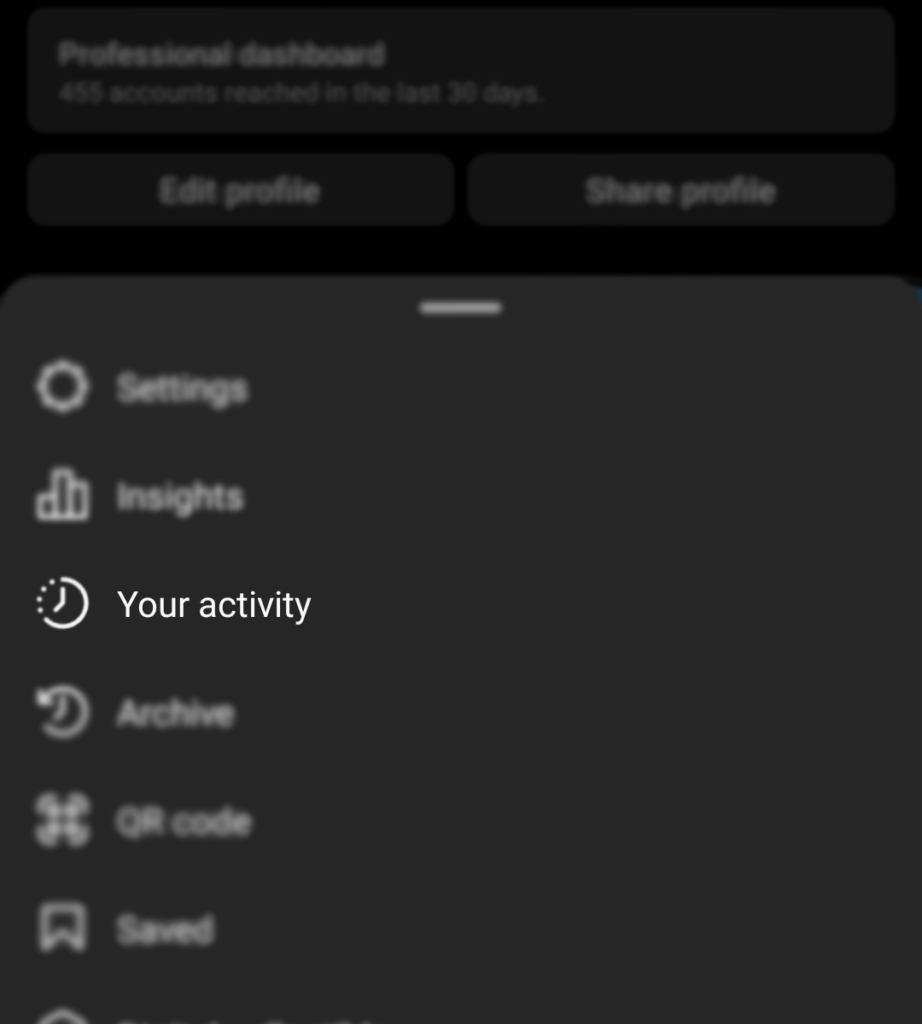
1. Instagram activity:
2. Primary location:
Our analysis has found that your primary location not only affects your account’s reach but also determines the type of ads you see on all Meta platforms.
Your business’s primary location is determined by Meta technologies on the basis of:
a) The current city or town that you entered on your profile;
b) Connection Information, such as the IP address of your device;
c) Activity from the use of Meta technologies, such as check-ins;
d) Precise device location.

3. Content:

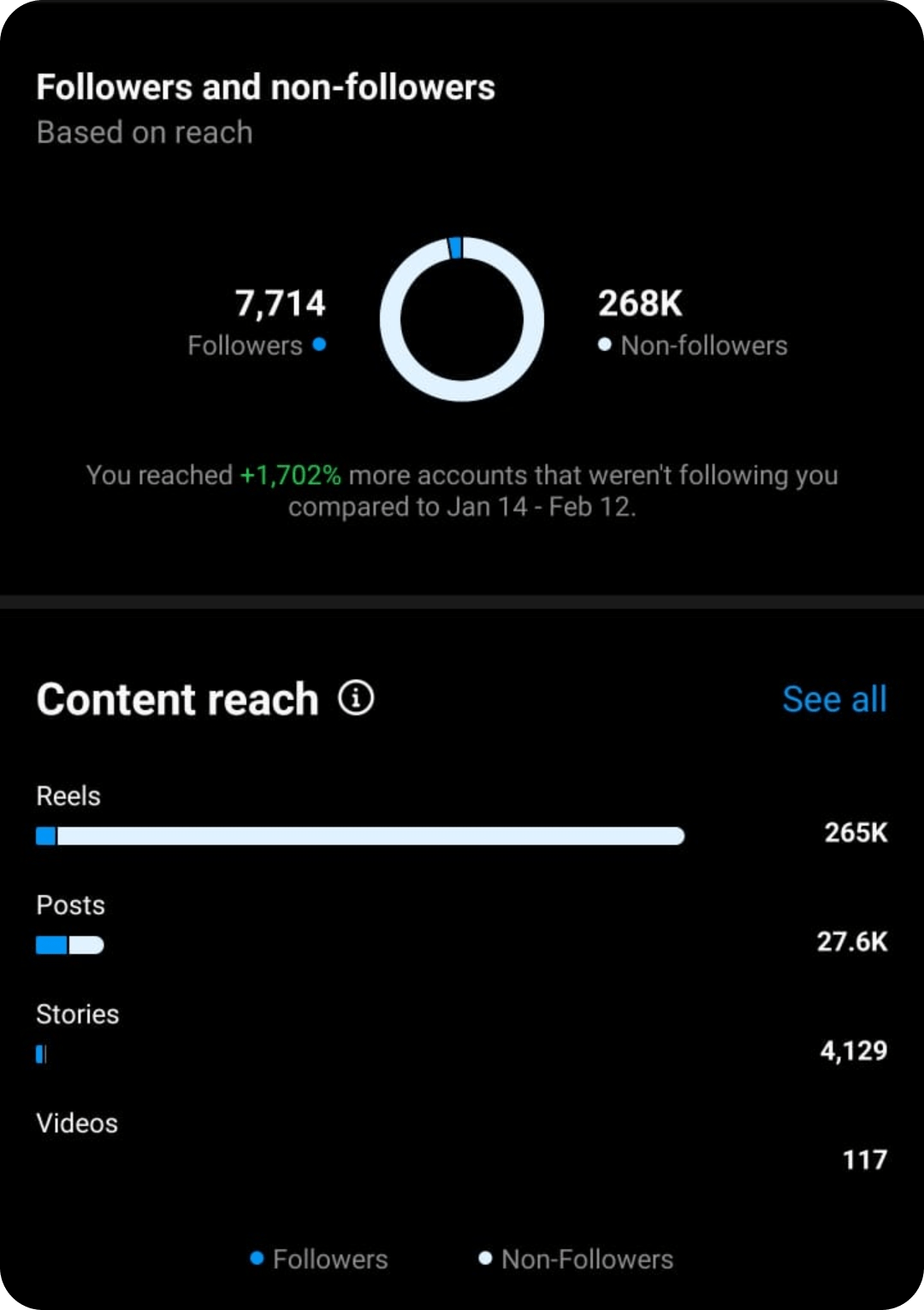
The type of content you create is recognized by the Instagram algorithm. Based on the general interactions, Instagram creates an audience persona of accounts that generally engage with your content and uses this data to serve your content to similar audiences in the future.
4. Frequency:
The frequency of posts also affects an account’s reach. Put simply, consistency helps to build more followers for your account.
5. Time Schedule:
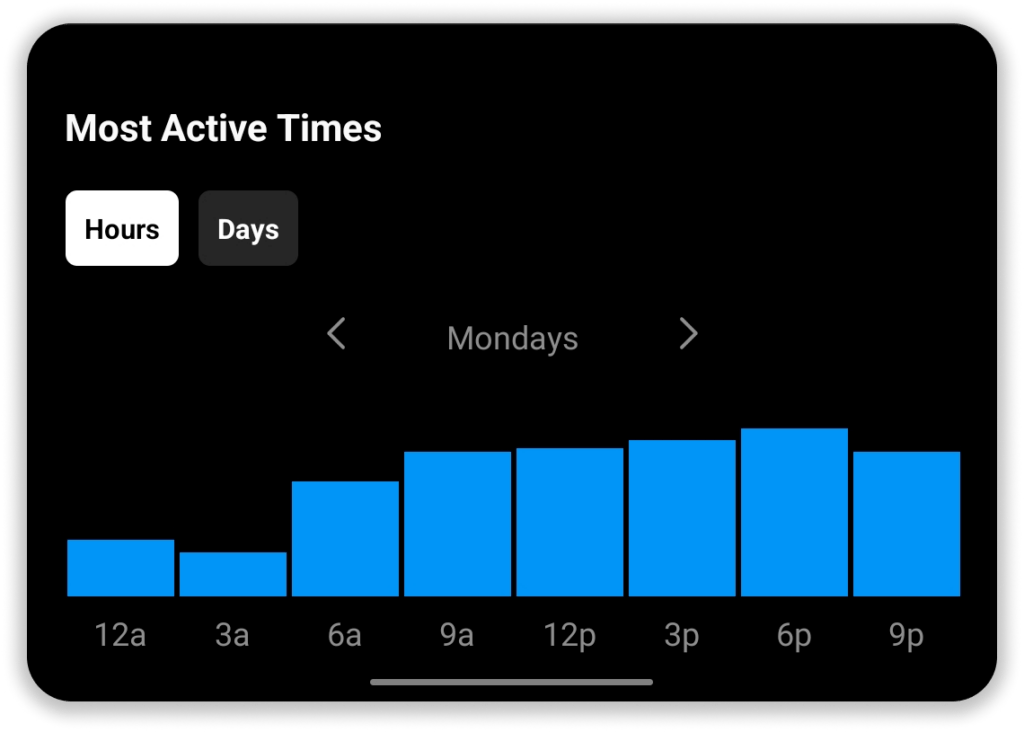
Audience interaction is crucial to your account’s reach. So, posting your content at the appropriate time is important.
So, how do we use these parameters to target a specific geo-location better?
6 Tips to improve geo-targeted Instagram reach
These tips have been tried and have proven successful for targeting audiences in targeting specific locations:
1. Mention your serving location:

Your business can make itself discoverable by sharing its serving location in each post. It provides the followers of your business’ page with information about the location of the business and where to find them.
2. Use your business address:
Stating your business address on platforms like Instagram and Facebook will help increase your competitive advantage. Providing the address details of your business will help followers of your page to directly connect with you through your business’ Instagram profile. It becomes easier for people to find your business.
3. Location-specific Hashtags:
To stay ahead in the social media marketing game, one must understand the power of hashtags. The language used in the content piece, hashtags and captions can help label your content for maximum reach. Using the correct hashtags for location helps your content reach the right people.
4. Use location stickers:
Using location stickers in story posts is a great way to attract customers. It allows your business to get targeted exposure as your business’s post shows up any time a user searches for the tagged location.
5. Language of the Heart:
To really connect with your target audience in a specific geographic region, it will be in your interest to use the regional or local language in your content to better connect with your target audience. You may even go a step further and use the regional language in your bio/ description.
6. Engage accounts in desired locations:
To increase your account’s reach, interact with accounts and people from the desired location. Respond to DMs and comments on your account from desired accounts. Start conversations by asking questions on your posts to increase your account’s visibility and reach.
Takeaway
With more and more businesses going online, social media marketing has become inevitable. Using Instagram to attract targeted audiences is a common practice for businesses. Like any other business strategy, the marketing being done by the Company through Instagram too needs to be constantly monitored.
Did these tips help you in increasing your business’s Instagram reach?
Let us know by posting in the comment section below.