Top LinkedIn Features in 2025
Introduction
LinkedIn is no longer just a professional networking site—it’s a marketing and sales juggernaut. In 2025, the platform continues to innovate, offering businesses advanced tools and features to grow their brand, nurture leads, and drive conversions.
As more businesses rely on LinkedIn for B2B marketing and social selling, keeping up with the platform’s latest offerings has become essential for staying competitive. Whether you’re a small startup or a global enterprise, LinkedIn’s features provide unparalleled opportunities for engagement and growth.
Let’s dive into LinkedIn’s top features in 2025 that every business should leverage for marketing and sales success.
1. LinkedIn AI Assistant for Content and Engagement
LinkedIn’s AI Assistant, launched in late 2024, is a game-changer for businesses. It helps companies create engaging posts, refine ad copy, and even analyze audience sentiment. By leveraging generative AI, businesses can maintain a consistent tone and create impactful content tailored to their audience.
Benefits:
- Generates ideas for posts based on trending topics in your industry.
- Suggests optimal post timings to maximize reach and engagement.
- Offers personalized responses for comments and messages, fostering real-time engagement.
2. Enhanced Sales Navigator 2025
The latest iteration of LinkedIn Sales Navigator comes packed with features to streamline prospecting and boost sales. With AI-powered lead recommendations and deeper integrations with CRM tools, Sales Navigator is a must-have for B2B sales teams.
Key Features:
- Smart Lists: Automatically updated lists of prospects based on defined criteria like job title changes or company growth.
- Conversation Insights: AI-driven analysis of past interactions to suggest the best follow-up actions.
- Warm Lead Alerts: Notifications when a lead interacts with your content or changes roles.
3. LinkedIn Audio Events and Video Rooms
LinkedIn’s Audio Events and Video Rooms have grown exponentially in 2025, providing businesses with new ways to engage audiences. From hosting live Q&A sessions to panel discussions and product launches, these features offer immersive, real-time interaction.
Benefits:
- Attract high-quality leads by showcasing expertise.
- Use video and audio analytics to measure audience engagement.
- Record sessions for on-demand access, extending the content’s reach.
4. Creator Mode Upgrades
Creator Mode has expanded to include advanced analytics, monetization options, and collaboration tools, making it a go-to for businesses looking to amplify their brand voice.
What’s New:
- Detailed follower insights, helping creators and businesses tailor content more effectively.
- Opportunities to co-create content with influencers and collaborators directly on the platform.
- Subscription-based premium content for niche audiences.
5. Advanced Ad Targeting and LinkedIn Ads Manager Updates
LinkedIn Ads Manager now incorporates AI to help businesses run smarter, more efficient campaigns. Enhanced targeting options make it easier to reach decision-makers, while campaign optimization tools ensure better ROI.
Key Updates:
- Interest-Based Targeting: Focus on users’ professional interests alongside traditional criteria like job titles and industries.
- A/B Testing Automation: AI suggests and tests multiple ad creatives to identify what works best.
- Dynamic Ads: Personalized ads that adapt in real-time based on user behavior.
6. Skill-Based Networking and Recruitment
Skill badges and endorsements have become more prominent, enabling businesses to identify and connect with talent based on specific expertise. For marketing and sales teams, this feature helps streamline hiring and networking.
Why It Matters:
- Businesses can showcase team skills to build credibility with clients.
- Sales teams can connect with prospects whose skills align with their offerings.
7. LinkedIn Insights Hub
The LinkedIn Insights Hub is a new analytics dashboard offering real-time data on industry trends, audience behavior, and competitor performance.
How It Helps:
- Pinpoints trending topics in your niche for timely content creation.
- Benchmarks your performance against competitors in similar industries.
- Provides detailed demographics and engagement stats for better targeting.
8. Interactive Polls and Surveys
Interactive polls and surveys have become a vital tool for market research and audience engagement on LinkedIn. These features allow businesses to gather feedback while keeping their audience engaged.
Best Practices:
- Use polls to identify pain points and tailor solutions accordingly.
- Conduct surveys to gauge customer satisfaction or measure campaign success.
9. LinkedIn Stories 2.0
LinkedIn reintroduced Stories with enhanced capabilities, including clickable links, call-to-action buttons, and better analytics. Businesses can now share quick updates, behind-the-scenes moments, and promotions in a way that feels fresh and engaging.
Pro Tip: Post stories during events or product launches to keep followers updated in real-time.
10. AI-Driven Personalization in Messaging
LinkedIn’s AI now powers InMail messages, allowing businesses to personalize outreach at scale. This feature suggests custom introductions, highlights mutual connections, and drafts tailored proposals.
Why It’s Effective:
- Saves time while maintaining a personal touch.
- Improves response rates by aligning messages with recipient interests.
Conclusion
LinkedIn’s features in 2025 are tailored to meet the demands of modern businesses, offering tools that drive marketing and sales success. From AI-powered insights to immersive live events and advanced targeting capabilities, the platform empowers companies to connect with their audience in meaningful ways.
For businesses looking to stay ahead, leveraging these features isn’t just an option—it’s a necessity. Whether you’re scaling your sales pipeline, building brand authority, or fostering industry connections, LinkedIn provides the foundation for sustainable growth in 2025 and beyond.
Why Am I Obsessed With LinkedIn Games?
Introduction
Alright, I’m going to confess something: I’m officially addicted to LinkedIn games.
Yes, you heard that right—LinkedIn, the platform we all thought was just for career stuff, has me hooked with its new casual games.
I didn’t think LinkedIn could compete with my social media or gaming apps, but here I am, procrastinating on real work by playing Queens, Pinpoint, and CrossClimb.
And honestly, I’m kind of loving it.
Why Am I Obsessed With LinkedIn Games?
I initially thought the idea of games on LinkedIn sounded like a bad joke. I mean, this is the place where you polish your professional persona, not play games, right?
But LinkedIn’s new games have managed to blend productivity and fun, and now I’m spiraling into a weird addiction I didn’t see coming.
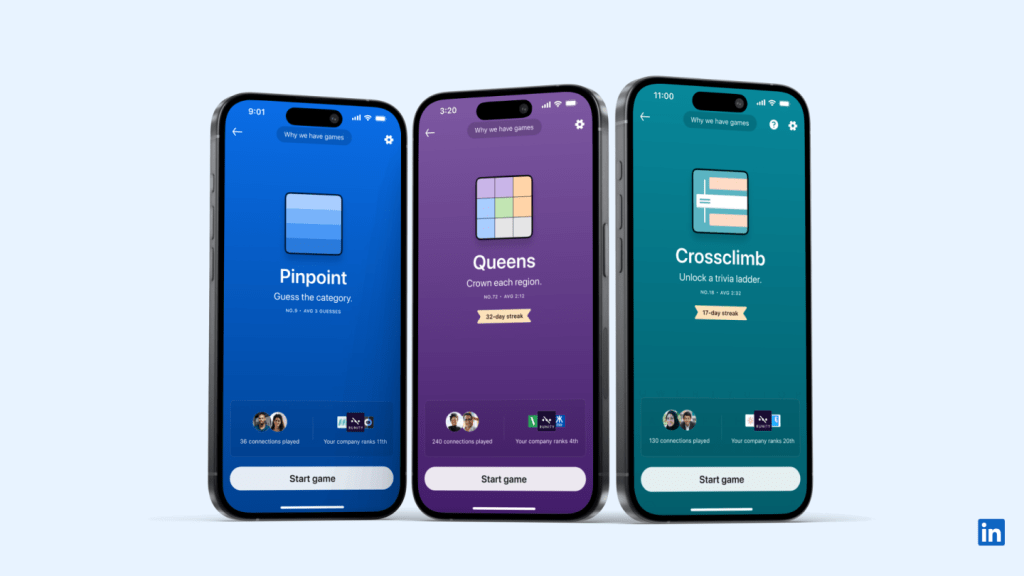
- Queens
This game is a brainy twist on chess, where players must place queens on a chessboard without them attacking one another. It’s designed to challenge users’ strategic thinking—a skill highly prized in leadership roles. Queens not only sharpens problem-solving skills but offers a friendly way to compete with peers or even potential employers. Imagine challenging a recruiter to a match after a networking event—it could make for a memorable connection!
- Pinpoint
Pinpoint, a classic “spot the difference” game, tests attention to detail—a skill essential in professions ranging from engineering to editing. By gamifying this task, LinkedIn provides a low-pressure, fun way to engage while practicing critical skills. Moreover, it encourages users to focus on small details, making it ideal for industries where precision matters.
- CrossClimb
CrossClimb challenges players to form words by connecting dots on a climbing wall. It’s all about quick thinking and agility, which are great metaphors for navigating fast-paced professional environments. This game subtly reinforces the importance of staying sharp in dynamic situations—much like how one needs to navigate a rapidly changing job market or workplace.
But Is This Really What LinkedIn Should Be Doing?
Honestly, I’m torn.
On the one hand, I love these games, and I know I’m not the only one. These casual challenges let me take a break from scrolling through endless corporate jargon and actually enjoy my time on the platform.
LinkedIn, a site once known for being too serious, is finally lightening up.
I mean, who knew playing chess on a career platform could be my new form of “networking”?
But then the pragmatic side of me kicks in.
Is this really how we want to engage with LinkedIn?
A part of me feels like the platform is drifting away from its professional roots.
Are we diluting LinkedIn’s core value by turning it into a place for games? What happens when a recruiter wants to connect, but I’m too busy strategizing my next move on Queens?
What’s the Point of LinkedIn Games Anyway?
I can’t deny LinkedIn’s strategy here is clever.
It’s gamifying professional engagement, making us want to spend more time on the platform.
They’ve clearly taken notes from other platforms like Duolingo or Fitbit, which use gamification to keep users coming back for more.
But LinkedIn is also treading into unfamiliar waters: Can games really foster professional relationships?
Here’s the thing: Games like Pinpoint or CrossClimb do more than just kill time—they subtly encourage brain training, attention to detail, and problem-solving, skills that are actually valuable in the workplace.
So maybe LinkedIn’s onto something here. Maybe they’re just giving us a new way to build those soft skills we usually struggle to demonstrate on a resume.
And networking?
Let’s be honest: Ice-breaking on LinkedIn can be awkward as hell.
Playing a quick round of chess or spotting differences in images might be a much easier way to get a conversation started than the classic, “Hey, I see we have mutual connections. Let’s chat.”
But Could LinkedIn Overdo It?
Of course, like anything addictive, there’s a danger here. LinkedIn could easily go overboard with the games, turning what should be professional development into pure distraction.
What happens when instead of updating my profile or messaging connections, I’m hyper-focused on beating my high score in Queens?
LinkedIn is still supposed to be a platform for career advancement, after all, and it needs to find that balance between fun and function.
We’ve seen platforms like Foursquare, once gamified with check-ins and badges, lose their edge because they leaned too heavily into the gaming aspect. LinkedIn could face the same fate if games start taking center stage over actual career-building content.
Lessons for Other Startups: Gamification Done Right
For startups watching LinkedIn’s move, the key takeaway here is about balance.
Gamification works wonders for engagement when it’s done right—but only if it complements the product’s core purpose.
Fun and productivity can coexist—just don’t forget why people came to your platform in the first place.
Here are some good real-life examples:
Duolingo
Duolingo’s success stems from its game-like learning environment. It uses streaks, points, and badges to make learning new languages fun and engaging.
LinkedIn is aiming for a similar approach, using short, interactive games to motivate users to engage with the platform more frequently.
The critical takeaway for LinkedIn is to keep games brief and goal-oriented, so users leave with a sense of accomplishment rather than distraction.
Fitbit’s Step Challenges
Fitbit successfully turned physical activity into a competition, encouraging users to hit step goals by comparing themselves to friends. In a similar vein, LinkedIn’s games like CrossClimb tap into users’ competitive spirit, pushing them to “level up” professionally.
The lesson here is that competition—done in moderation—can foster both engagement and productivity, but it should align with the platform’s core mission.
Salesforce’s Trailhead
Salesforce has gamified its entire training system with Trailhead, where users earn badges and certifications as they learn how to use Salesforce products. This has not only increased engagement but also significantly boosted professional development within their ecosystem.
LinkedIn could follow this blueprint by tying game achievements into actual skill assessments, allowing users to earn certifications or badges that enhance their professional profiles.
3 Tips for Gamifying your Business
For any startup willing to dip into the gamification, keep the following tips in mind:
Tip #1: Micro-Engagements, Not Time Drains
The brilliance of LinkedIn’s games (and why I keep playing) lies in their brevity. They’re easy to start, but they don’t demand hours of attention. Startups need to think about micro-engagements that get users coming back without eating up too much time.
Tip #2: Stay True to Your Brand
If LinkedIn started introducing candy-crush-like games, it’d be a disaster. The games still fit within LinkedIn’s professional tone, even if they’re fun. The lesson here is clear: Don’t lose sight of your core brand in the rush to add more engagement features.
Final Thoughts: Am I Mad About LinkedIn Games?
Am I still addicted to LinkedIn games? Absolutely. Do I feel guilty about it? Eh, a little. But honestly, I’m enjoying the fact that LinkedIn finally feels human. It’s not just about career bragging or endless messages from recruiters anymore—it’s about having a little fun while staying sharp.
If LinkedIn keeps things in moderation, I think the games could actually be a game-changer (pun intended) for how we network and interact online. But if they take it too far? Well, then we might all just end up playing chess while our resumes collect dust.
Here’s hoping LinkedIn can keep the fun without losing focus—because for now, I’m all in on CrossClimb.
LinkedIn Badges in 2024: Fading Trend or Valuable Asset?
Introduction
Remember when LinkedIn badges were akin to a badge of honor and were treated as a professional accomplishment and a way to stand out in the competitive job market?
LinkedIn badges were introduced to enhance users’ profiles, validate skills and achievements, and help professionals stand out. LinkedIn badges were used heavily by individuals and organizations to establish their expertise and improve visibility.
However, over time as LinkedIn evolves from a job board into a complex sophisticated professional networking site the relevance of these badges has come into question. In this Review, I aim to critically assess whether LinkedIn badges are still significant in 2024.
What are LinkedIn Badges?
Badges on LinkedIn are visual indicators that appear on a user’s profile. They illustrate achievements or skills gained. There are multiple badges on LinkedIn like:
1. Profile Completeness Badges:
This badge is given when the user has filled up different aspects of their LinkedIn profile, such as work experience, qualifications, professional photo, and acquired skills.
2. Skill Assessment Badges:
These are given to users when they pass the skills assessments offered by LinkedIn in programming, project management, or digital marketing. In this case, the badges are displayed together with the skills, showing that a user is conversant in a particular area.
3. LinkedIn Learning Certifications:
The user earns a badge showing new knowledge or expertise in some subject area after completing courses on LinkedIn Learning. These badges are designed to show the user’s dedication towards professional development making it easier for recruiters or employers to spot them while surfing through the profiles.
Value Proposition of LinkedIn Badges
When LinkedIn badges were first introduced, they had several purposes:
1. Credibility and Validation:
Badges were designed to increase the authenticity of the user’s profile by validating the user’s skills, the courses completed, or the completeness of his LinkedIn profile. In this manner, LinkedIn badges provide legitimacy to claims made by the user on his profile through measurable assessment.
2. Distinction:
With 1 billion members in more than 200 countries and territories worldwide LinkedIn has become a highly crowded professional space and LinkedIn badges help differentiate users. They prove especially helpful to job seekers trying to differentiate between similarly qualified applicants, especially when looking for candidates with technical skills.
3. Evidence of Skill:
For professionals in skill-based industries such as tech and marketing, badges provide evidence of verifiable skills. This proves particularly helpful for those looking to transition into a new field as it demonstrates that the users holding badges have devoted time and effort to learning and capacity building.
Do LinkedIn Badges Still Add Value Today?
Though LinkedIn badges bring much value to user profiles, the changing recruiter expectations and expanding professional networking space have impacted the effectiveness of LinkedIn badges. I found some of the reasons for this diminished impact to be:
1. Changes in User Perception:
As more and more people received badges on LinkedIn, the value LinkedIn badges once held started deteriorating. At present experts usually deem them to be shallow indicators of merit rather than the benchmarks of mastery they were once considered. Experts often ignore LinkedIn badges as expressions of merit because passing an assessment in a certain skill does not equate to practical mastery over the subject, sowing seeds of skepticism.
2. Evolution of LinkedIn’s Features:
LinkedIn has introduced features that decrease the utility of badges. New options such as endorsements, recommendations, or activity-based sections like “Featured” make it easier to demonstrate true expertise instead of just mentioning award-winning abilities. The growing concept of thought leadership through posts, articles, and engagement has increasingly pulled people away from using LinkedIn badges.
3. Industry and Recruiter Perspectives:
From an employer’s point of view, LinkedIn badges are no more something that separates one from another. Today a LinkedIn badge is but a synopsis of a user’s skills, and many recruiters now shy away from it and show more interest in prior experiences, experience through project outcomes, and detailed personal recommendations. Badges are no longer sufficient when making hiring decisions.
Benefits of Having LinkedIn Badges
Even though LinkedIn badges are losing their charm, there are a few areas where badges on your profile might still be useful:
1. Instant Verification of Skills:
Skill Assessment Badges act as instant proof of technical skills, especially when a job posting seeks specific skills. They could work as the beacon that catches the recruiter’s eye especially when it comes to niche skill sets.
2. More Profile Engagement:
Since LinkedIn’s algorithm shows more actively used profiles on top, earning badges may help push up the ranking of a user’s profile on the platform. This makes it more likely for the profiles to appear in search results, thus helping the profiles gain more visibility.
3. Streamlining Recruitment:
For technical professionals, skill badges are tantamount to some level of competency. Recruiters can use LinkedIn badges as quick indicators to help streamline the process of filtering through numerous applications to identify potential candidates for specific positions.
Disadvantages of LinkedIn Badges
Although the badges do have their advantages, there is two major problems with using LinkedIn badges:
1. Overuse and Lack of Differentiation:
In competitive environments, if something is easy to obtain, it ends up losing its value. At present LinkedIn badges have been so excessively used that any more use of the badges will pretty much dilute the badge itself.
Since almost every professional can easily attain the badges, their value has greatly declined. Outside of LinkedIn, they amount to nothing. Most employers and recruitment managers focus more on a candidate’s formal qualifications, work experience, and references rather than their collection of LinkedIn badges.
Since they are neither applied nor transferred elsewhere in the professional world or outside the LinkedIn platform, they do not have much practical application or value.
2. Absence of Critical Influence in Professional Experience:
While LinkedIn badges are good at increasing profile visibility, I was unable to gather substantial evidence of any positive impact of LinkedIn badges in the hiring of mid and senior-level professionals. Most mid and senior-level professionals were hired due to their rich experience and not due to LinkedIn badges.
Alternatives to LinkedIn Badges for Professional Branding
There are alternatives to LinkedIn badges for developing one’s professional brand. Here, are some of the alternatives to LinkedIn Badges:
1. Building a Strong LinkedIn Profile:
Instead of using LinkedIn badges users can better reflect real-world capabilities by providing detailed information about their experience and providing an apt synopsis and articulate headline for the same. Users can provide details about their achievements and projects with measurable results to create a strong LinkedIn profile.
2. Recommendations and Endorsements:
Greater influence can be derived from peer recommendations and third-party endorsements by supervisors and clients than from LinkedIn badges. Colleague endorsements help build personal testimonies based on credible credential relationships about skills and work habits, while supervisor/client recommendations help boost the user’s profile.
3. Thought Leadership:
Sharing posts, posting, and sharing opinions on discussion groups allow professionals to be perceived as highly qualified, aware, and connected to the community. This responsive action helps garner credibility and build personal branding.
4. Utilizing LinkedIn’s New Features:
Using features like LinkedIn Creator Mode, Newsletters, and Featured Content where professionals can share the work done them can prove to be more effective than LinkedIn badges as they are much more engaging and interactive than LinkedIn badges.
Conclusion
Though several benefits of LinkedIn badges remain the same in the modern professional environment they no longer hold the same significance as they did in the past. While new professionals and people working on a niche skill set may still find value in LinkedIn badges, I believe most other professionals would probably find focusing on other parts of their LinkedIn profile like endorsements and recommendations more valuable in advancing their careers.
Have you used LinkedIn badges? If so, what was your experience? Share your views and join the discussion on how to enhance your LinkedIn presence without relying on badges in the comment section below.
For other similar Reviews consider visiting our website.
Is LinkedIn the New Instagram? Here’s how you can leverage it
When Microsoft acquired LinkedIn in 2016 it indicated that there will be upcoming changes in the nature of people’s favorite professional networking platform.
Microsoft CEO Satya Nadela specifically mentioned,
“The more we grow LinkedIn, the better it benefits Microsoft.”
Following that vision, many changes have been made to the platform, and as we understand these are not only beneficial for Microsoft, but also for LinkedIn itself and for millions of businesses as well.
In this Review, we discuss the recent changes in LinkedIn, and how this ‘change-strategy’ is going to affect LinkedIn in the long term, and also what businesses can do to leverage it in the best possible way.
Recent Changes in LinkedIn
LinkedIn is a professional networking platform that connects people, and companies. It has over 800 million members and 55 million registered companies. LinkedIn is considered an essential channel for any B2B marketer, as it allows them to reach potential customers, partners, and employees.
LinkedIn has been making some changes to its platform in recent years, some of which may resemble Instagram. Reid Hoffman, co-founder of LinkedIn, has been a vocal advocate for the platform’s recent changes. In a number of interviews and blog posts, Hoffman has argued that the changes are necessary to make LinkedIn more relevant to the needs of today’s professionals.
Hoffman has said that the changes are designed to make LinkedIn more “social” and “visual.” These changes are designed to make LinkedIn more accessible to mobile users. Further he mentioned that these changes will make LinkedIn more “personalized” and the company is using artificial intelligence to personalize the content that users see, based on their interests and job title.
Here are some of the key changes made to the platform:
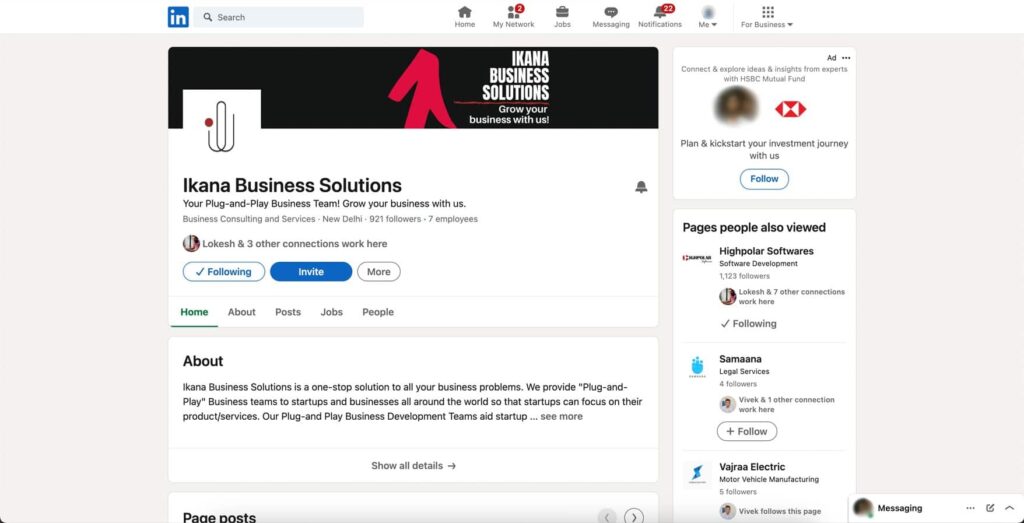
1. New design:
LinkedIn has rolled out a new design that is more modern and user-friendly. The new design features a cleaner layout, larger fonts, and more white space. It also makes it easier to find and use the features that you need.
2. Focus on video content:
LinkedIn has been making a big push into video content in recent months. The company has added new features such as live streaming and video resumes. Live streaming allows users to broadcast live video to their connections, while video resumes allow users to create video versions of their resumes. LinkedIn has made it easier for users with disabilities to watch and interact with videos on the platform. This includes adding closed captions and transcripts to all videos, as well as providing a way for users to control the speed of playback.
3. Focus on job search:
LinkedIn has added new tools and resources to help users find their next job. These tools include a new job search engine, a job board, and a resume builder.
LinkedIn has made it easier for users to find jobs that are a good fit for their skills and experience. This includes adding new filters to the job search results page, as well as providing more information about each job opening.
4. More personalized experience:
LinkedIn is using artificial intelligence to personalize the newsfeed, recommendations, and other features.
For example: If you’ve been viewing jobs in the marketing field, LinkedIn might recommend other marketing professionals to connect with, or it might suggest articles or videos about marketing that you might be interested in. Also, LinkedIn might use AI to suggest relevant jobs that you might not have found otherwise.
5. Greater emphasis on community:
LinkedIn is also placing a greater emphasis on community. The company has added new features such as groups and events. Groups allow users to connect with other professionals who share their interests, while events allow users to attend live events with other LinkedIn users.
6. Post scheduling:
LinkedIn now allows users to schedule posts in advance, so they can share content at times when their audience is most likely to see it. This is a great way to stay top-of-mind with your connections and followers.
7. Content analytics:
LinkedIn now provides users with more insights into how their content is performing. This includes information about how many people have seen their posts, how many people have clicked on links, and how many people have engaged with their content.

8. Updates to B2B product search:
LinkedIn has made it easier for businesses to find the products and services they need. This includes adding new category filters and improving the relevance of the product pages.
Reasons Behind These Changes
The recent changes in LinkedIn are being done to make a strategic shift in its primary appeal. LinkedIn is trying to move away from being just a job board and become a more comprehensive professional network. Social media has become an increasingly important part of people’s lives, and LinkedIn is no exception. Hence it took the route of Instagram to be more ‘social’ and ‘visual’, as also said by Hoffman. If we look closely at these two platforms, LinkedIn now have almost all the features of Instagram.
For example: You can now add several types of posts in LinkedIn, such as photo, video, template, event, celebrate, job, poll, document and services. Now if we look at the post features of Instagram we will see that all these features, except jobs and services, are present there too. Also, LinkedIn’s new post scheduling feature is totally similar to Instagram.
In order to stay relevant, LinkedIn is making sure that it is offering a platform that is both informative and engaging. The company is doing this by adding new features that make it easier for users to connect with each other, share content, and learn new things. The nature of work is changing, and LinkedIn has adapted its platform to make it easy to use for people who are not in the office.
To provide personalized experiences to its users LinkedIn is using artificial intelligence to personalize the content that users see, based on their interests and job title. Similar to social media platforms like Instagram, LinkedIn is also promoting the sense of community by suggesting connections with common goals and interests, enabling a platform for people to build their professional networks and find jobs and opportunities.
How will these changes affect LinkedIn’s future?
Hoffman has said that he is confident that the changes will make LinkedIn more successful in the long run. He has said that the company is “on the right track” and that he is “excited about the future of LinkedIn.”
LinkedIn’s financial performance is closely tied to its user growth and engagement. According to its parent company Microsoft, LinkedIn’s revenue grew 27% year-over-year in the first quarter of 2022, driven by strong demand for its marketing solutions and learning products. LinkedIn also reported a record level of engagement, with sessions up 30% year-over-year and content shared up 50% year-over-year. These metrics indicate that LinkedIn’s recent changes are having a positive impact on its financial performance by increasing its user base and retention.
How can you leverage the newly evolved LinkedIn?
Here are some of the latest features that businesses can leverage to enhance their presence and performance on LinkedIn:
1. Videos with Auto Captions and High Contrast:
The add video feature of LinkedIn is a great opportunity for businesses to connect with their audience by being more creative with their content as on Instagram. Also, there is a live streaming feature that allows businesses to connect to their audience and respond to their queries in real time. Besides, LinkedIn has recently taken steps to make videos more accessible for hearing or visually impaired individuals. Captions are automatically generated and can be edited by the user before posting. These features can help businesses reach a wider and more diverse audience and demonstrate their commitment to inclusion and accessibility.
2. LinkedIn Events Analytics:
LinkedIn Events Analytics provides valuable insights into the performance and impact of virtual or in-person professional gatherings. Businesses can track metrics like views, registrations, attendees, engagement, and feedback. Additionally, they can download attendee lists for follow-up. This tool helps measure and enhance event strategies and ROI on LinkedIn.
3. LinkedIn Creator Mode:
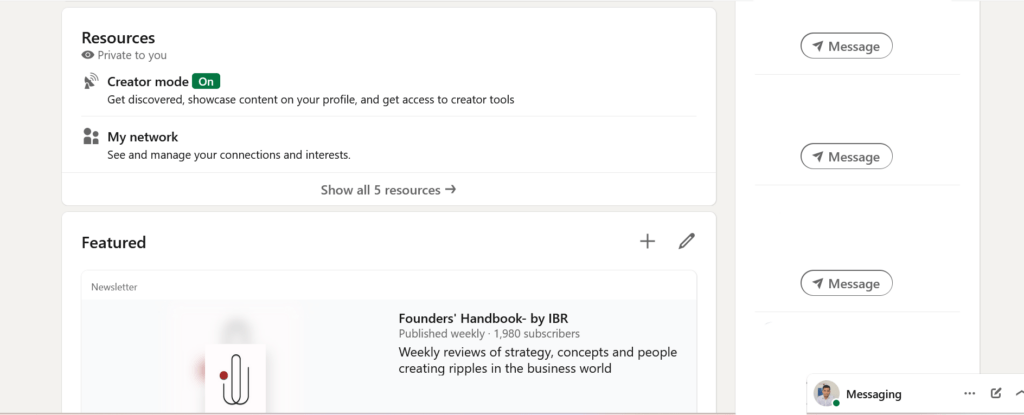
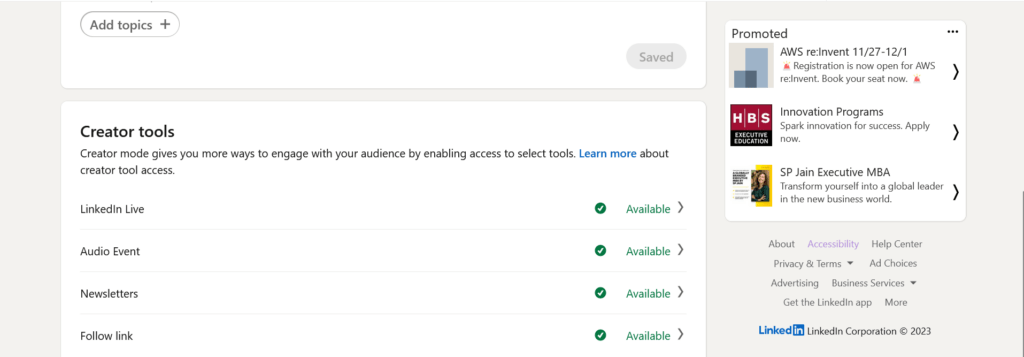
LinkedIn Creator Mode enables users to highlight their content creation skills and attract followers. By selecting relevant hashtags, users can showcase their expertise and display their content in the Featured section of their profile. This feature helps businesses establish thought leadership, build their personal brand, and grow their follower base.
4. LinkedIn Advertising:
Instagram is the popular go to platform for businesses for advertising. But recently LinkedIn is actively promoting its advertising solutions and it can prove much more beneficial for businesses. In Instagram not every user is looking for products or services because it is a platform for varied interests. But LinkedIn is a dedicated platform to promote the interests of, not only job seekers, but also businesses and service providers. In this platform people are actively looking for networking, services, and expertise, hence posting advertisements on LinkedIn can be a big plus for businesses.
Conclusion
LinkedIn has evolved to be more user-friendly and engaging, and for businesses, these features hold great opportunities for growth. The newly inducted features of LinkedIn enable businesses to be more creative with their contents, engage with their audience more efficiently, and showcase their expertise, services, and products to a wider audience more effectively.
That’s all for now, share your LinkedIn journey with us in our comment section.