iSharing App Review: Share Location Stay Connected
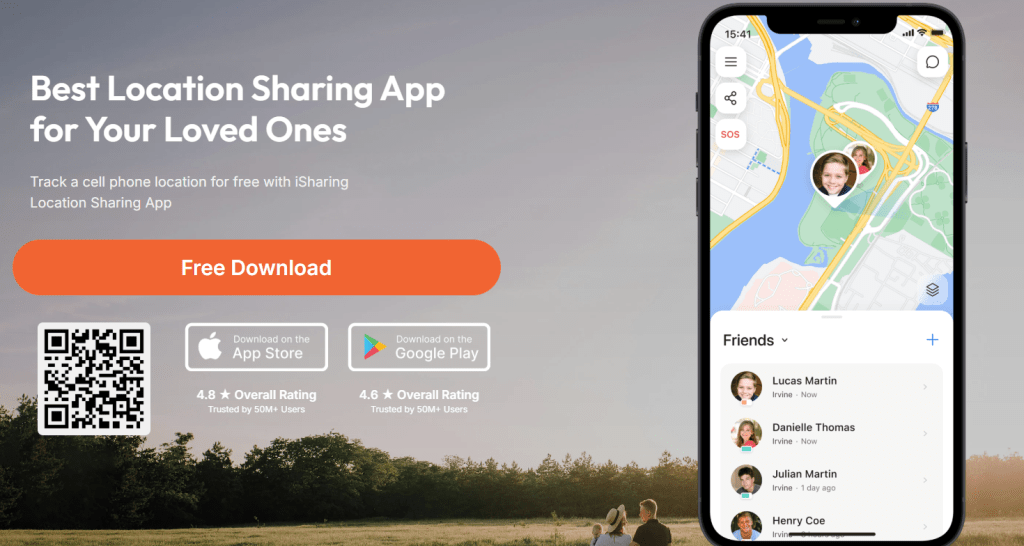
iSharing is a real-time GPS locator for families and close friends. The idea is simple. Create a circle, invite people you trust, see each other on a live map, and get alerts when someone arrives or leaves a place. The app adds safety touches like SOS, driving reports, and battery or inactivity alerts. iSharing positions itself as a top-rated, free-to-start location sharing app with paid plans that unlock more history and controls.
Features of iSharing
1) Live location on an easy map
You and your circle can view each person’s live location on Google or Apple Maps with a clean interface. The app also supports multi-device tracking from one account and external share links for people who do not use the app.
2) Place alerts that tell you when someone arrives or leaves
Set a home, school, office, or any common spot. Get a ping when a friend or family member arrives or leaves. The Free plan allows one place, Silver allows five, and Gold or Platinum allow unlimited places.
3) SOS panic alert, with sound recording on paid plans
Tap SOS to start a timed alert that notifies your circle. On Silver and above, the SOS can include surrounding audio to give more context in an emergency.
4) Driving report and driving alerts
View speed and behavior history, and on higher tiers turn on driving alerts. The help docs describe how to enable drive alerts for specific contacts and explain accuracy and battery design. Gold and Platinum extend how long reports are kept.
5) Location history with longer retention on higher tiers
Free users can view their own 7-day history after watching an ad. Silver includes 7 days for everyone in the circle, Gold includes 90 days, and Platinum stores one year. Data is deleted after those windows.
Pricing
iSharing offers one free tier and three paid tiers. Pricing and inclusions below come directly from the site.
- Free – See live location, panic alarm, unlimited in-app messaging, and create circles.
- Silver – $7.99 per month. Everything in Free, 5 place alerts, 7-day location history, battery and inactivity alerts, SOS with recorded sound.
- Gold – $10.99 per month. Everything in Silver, unlimited place alerts, 90-day location and driving reports, driving alerts, and Street View, circle subscription sharing.
- Platinum – $14.99 per month. Everything in Gold, 1 year location history, 1 year driving report, web desktop access, priority support.
The plans page and help center also show feature matrices, and note that free trial availability can vary by country.

How iSharing Works
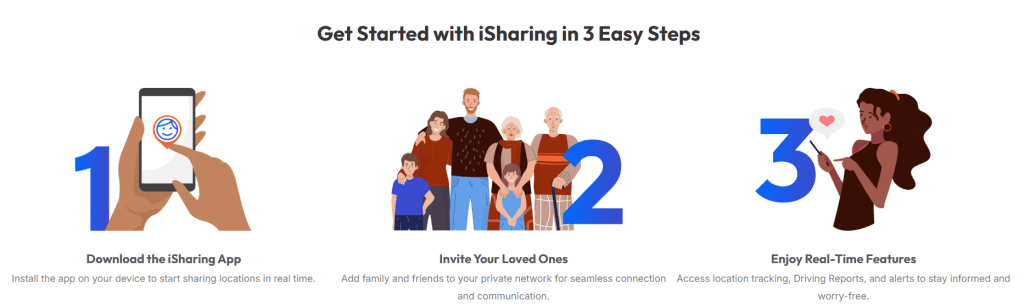
- Create your account with email or sign in with Apple, Google, or Facebook.
- Invite friends during signup or from the main screen with the plus button. Send the invite through your preferred messenger.
- View locations by tapping a friend’s name to center the map and see the current address.
- Add places and alerts from the Menu to receive arrival or departure notifications.
- Optional upgrades unlock more alerts, history, and reports.
You can also share your live location externally with people who do not have the app, and you can manage alerts per person.
Security and Privacy
- Data collected and retained. The privacy policy says iSharing collects registration info, precise geolocation, and some device and analytics data. Location is kept only as long as needed to provide the service, and then deleted or de-identified, with specific retention windows for history features. You can delete your account from the app.
- Sharing and advertising. The policy explains that iSharing may share personal information, including location data, with third parties for marketing or advertising, and with analytics partners. It includes opt-out guidance and a Do Not Sell My Personal Information page.
- In-app consent and security claims. The App Store listing highlights mutual consent for sharing, notes encryption in transit, and reminds users that continuous GPS can affect battery life.
If privacy is a top priority for your family, read the policy closely and set the in-app privacy controls that match your comfort level.
Pros and Cons
Pros
- Free real-time sharing to start with circles and messaging, so it is easy to test with your family.
- Granular alerts for places, battery, inactivity, and driving on the higher tiers.
- SOS with audio on paid plans, which can help in emergencies.
- Share premium through a circle, even though there is no formal family plan.
- Desktop access on Platinum, helpful for parents who prefer a bigger screen.
Cons
- Some key features live behind higher tiers. Driving alerts and Street View are not in Free or Silver, and web access is Platinum only.
- Privacy trade offs. The policy allows sharing some data, including location, with third parties for marketing. Users who want minimal data sharing will need to adjust settings or keep use limited.
- No dedicated family plan. You can share premium within a circle, but there is not a separate discounted family bundle.
- Battery impact is possible with continuous GPS, as the developer notes on the App Store.
What to Expect from iSharing
Most families will set one or two places first, like home and school, then add battery alerts for teens or elders. You open the app, glance at the map, and get on with your day. When someone arrives or leaves a place, you see a quick notification. If you upgrade, the driving report becomes a weekly check in for speed and hard braking, and the longer history makes it easier to look back at a busy day. People who travel together will like the external share link and Street View context on the higher plans.
IBR’s Review
If your goal is to keep family and close friends connected with live location and simple safety checks, iSharing is a good fit. The free plan is enough to try the basics with real-time maps and a single place alert. Silver and Gold feel balanced for households that want more alerts, SOS with audio, and meaningful history windows. Platinum is worth it only if you need one year of history and web access. Read the privacy policy and tune settings so they match your comfort level, then start small with one circle and two places.
Ratings
- Ease of Use: 4.6/5
- Features: 4.4/5
- Template Quality and Exports: 4.1/5
- Pricing and Flexibility: 4.3/
Overall: 4.4/5
Platinum only makes sense if you really need one year of history and desktop access. Read the privacy policy, tune the sharing settings, and start with one circle and a couple of places. If that feels useful after a week, step up to Silver or Gold. For most people who want peace of mind rather than a heavy surveillance tool, iSharing hits a good balance of ease, features, and price.