You’re in the middle of an important meeting and you need to transfer a file from your phone to your laptop—fast. Or maybe your remote team needs real-time device access to troubleshoot issues on the go. This is where AirDroid comes in.
Seamless connectivity between devices has become essential for productivity, much like how businesses leverage CRM systems to streamline operations and enhance efficiency
Designed to bridge the gap between mobile and desktop devices, AirDroid offers an efficient way to manage files, access devices remotely, and even control app usage across teams.
Overview of AirDroid
AirDroid is a remote device management tool that allows seamless cross-platform file sharing, remote access, and control of Android devices. Originally launched as a simple file transfer app, it has evolved into a powerful business tool, especially for startups managing mobile devices and remote teams.
It’s gaining popularity among business users, with over 50 million downloads on Google Play. Trusted by businesses for mobile device management (MDM) and enterprise security.
Offers remote access solutions, reducing downtime and boosting productivity.

Features of AirDroid
1. Wireless File Transfer
Move files between your PC and Android devices effortlessly, eliminating the need for cables. Ideal for businesses handling large volumes of files.
2. Remote Device Control
Access and control Android devices remotely. Useful for IT teams troubleshooting employee devices without physical access.
3. Screen Mirroring
Mirror your phone’s screen on a larger display for presentations, training sessions, or real-time monitoring.
4. SMS & Notification Management
Reply to business messages and manage notifications from your computer, keeping you focused on work without switching devices.
5. Security & Privacy Features
Supports end-to-end encryption for secure file transfers. Business owners can manage access control settings to prevent unauthorized access.

Pricing Model of AirDroid
1. Monthly Plan
- $3.99 per month
- Full access to all features for one month
- Auto-renewal, cancel anytime
2. Quarterly Plan
- $3.23 per month (billed quarterly at $9.69)
- Full access to all features for three months
- Auto-renewal, cancel anytime
3. Yearly Plan (Best Value)
- $2.50 per month (billed annually at $29.99)
- Full access to all features for one year
- Auto-renewal, cancel anytime
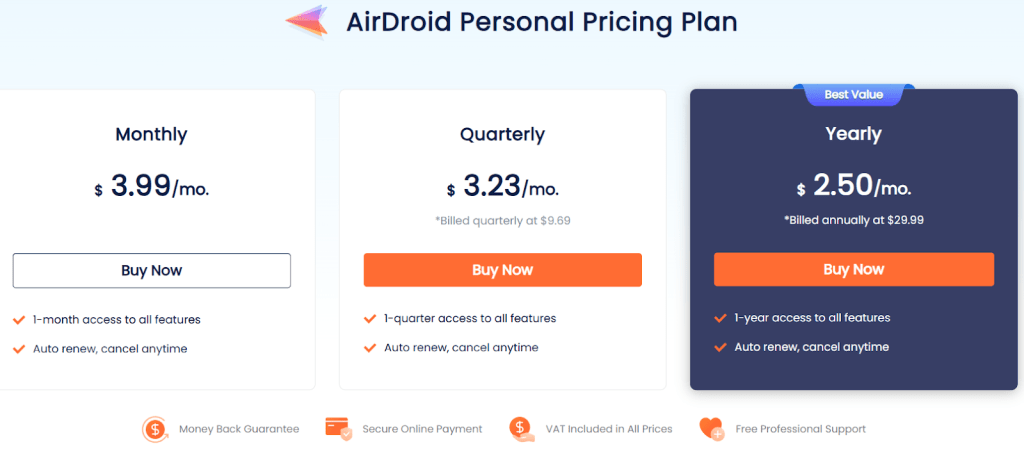
Additional Benefits:
✅ Money-back guarantee
✅ Secure online payment
✅ VAT included in all prices
✅ Free professional support
How AirDroid Works
1. Download & Install – Install AirDroid on both your mobile and desktop.
2. Create an Account – Sign up to sync your devices.
3. Connect Devices – Pair multiple devices for seamless management.
4. Start Transferring or Controlling Devices – Access, control, and manage files effortlessly.

Pros & Cons of AirDroid
Pros:
✅ Wireless, hassle-free file transfers
✅ Effective remote device control for IT team’s
✅ Secure and encrypted data transmission
✅ Business-friendly features for device monitoring
Cons:
❌ Limited features in the free plan
❌ No iOS device remote control (only Android)
❌ Business plan pricing can be expensive for startups
Alternatives to AirDroid
1. TeamViewer – Offers remote access but lacks file transfer efficiency.
2. Pushbullet – Great for messaging and file sharing but lacks remote control features.
3. MobiControl – More expensive but designed specifically for enterprise MDM.
IBR’s Review of AirDroid
For startups and small businesses, AirDroid serves as a highly effective tool for managing mobile devices remotely. If your business relies on field teams, remote IT support, or seamless device connectivity, this app is a strong contender. However, companies looking for advanced enterprise solutions might find its business pricing a bit steep compared to competitors like MobiControl.
– Remote teams: managing multiple devices
– IT support teams: handling troubleshooting
– Sales & field teams: who need instant file transfers
– Startups: looking for an affordable remote access solution
Overall Scores: 7.5/10
1. Ease of Use: 9/10
2. File Transfer Efficiency: 8/10
3. Security & Privacy: 7/10
4. Business Usability: 7/10
5. Pricing & Affordability: 6/10
Conclusion
AirDroid is a solid choice for startups and businesses needing a simple, yet powerful, remote management solution. While it has some limitations, its ease of use and feature set make it a worthy tool for business owners. If your startup relies on mobile devices for operations, AirDroid can boost efficiency and reduce operational roadblocks.
Popular Blogs
Cut Out Pro, Facecheck ID, Zeptos Dark Store, Chatgpt Wrapper Startups, Linkedin Badges, Lululemon Brand Loyalty, Which Category is Best for Youtube Channel?, Adobe Podcast AI Review, SproutGigs App Review, decathlon strategy, etsy india, redbull strategy, zalando supply chain, failed celebrity beauty brands, nestle marketing strategy, birchbox